










Google recently published a short guide on making websites more agent-friendly. It’s written for developers, which means a lot of the practical value gets lost on non-technical site owners.
But the guidance applies to everyone who runs a website. It just needs some context first, which is what this article provides.
How Agents View Your Site
To understand what Google is actually recommending, it helps to know how agents read a page in the first place. They use three primary methods: screenshots, HTML, and the accessibility tree.
Screenshots
It may seem obvious, but screenshots are worth understanding properly.
The agent takes a snapshot of the rendered page and uses a vision model to identify elements. Based on the screenshot, the agent can recognize that a search bar at the top-right is a global search, while a box in the middle is likely a form field. Visual cues can be helpful, as agents can use color, size, and proximity to determine importance. A big Delete button will likely be interpreted with more caution than a small “Help” link. However analyzing screenshots can be slow and expensive (in terms of used tokens), making it better as a backup when the structure is confusing.
When an agent needs to retrieve content from a rendered page, it uses a browser automation tool. The specific tool varies, but something like Playwright gives you a good sense of the category. These tools provide a programmable interface for automating browser tasks, and one of those tasks is capturing a screenshot of the current viewport (the visible portion of a page at any given scroll position).
Once the screenshot comes through there’s a decoding step, but you can think of it as simply looking at an image and extracting data, just like you would with any image.
So what does this tell us about how to structure our pages?
Think about what would make a screenshot easy to interpret. A screenshot is an image. You can’t interact with it, only read it. With that in mind, you’d want:
- High contrast text that reads clearly from the image
- Clearly labelled sections rather than one area flowing into the next. The sense of scroll and flow doesn’t exist in a screenshot.
- Obvious signals about what each element does. Think of a road warning sign and how much information it conveys instantly.
- Captions on images, since a screenshot strips away the surrounding context that might otherwise explain them
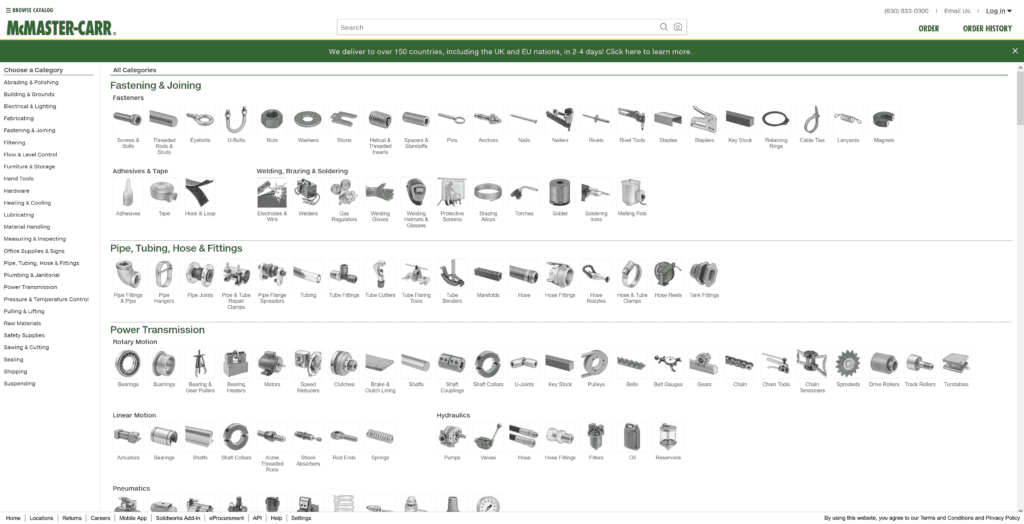
Take, for instance one of the most enduring and effective website designs in ecommerce, McMaster-Carr.

Take a screenshot from any part of the site, at any resolution, and it will be immediately obvious what you’re seeing. That’s the mark of a site that an agent will navigate easily by taking screenshots.
Does this mean you need to use the same spartan approach as McMaster-Carr? No, of course not. But always think about what is adding visual information versus what is just adding noise.
HTML
The next method is HTML. Here’s how Google describes it:
The agent analyzes the DOM and reads the HTML. It understands how elements are nested, the logical hierarchy of the DOM tree, attributes like IDs and classes that define structure, and raw data strings that form the site’s informational backbone. This helps the agent understand the relationship between elements. If a “Buy Now” button is inside a product container, the agent assumes that button belongs to that specific product.
There’s not a lot to go on here unless you’re already familiar with what the terminology means, so let’s break it down, starting with the DOM or Document Object Model.
The DOM, or Document Object Model, is the browser’s internal map of a webpage. When a browser loads a page, it doesn’t just display text and images. It builds a structured model of every element on the page and how they relate to each other.

Think of it like a family tree. At the top you have the page itself. Beneath that, sections. Inside each section, headings, paragraphs, images, buttons. Every element has a place in the hierarchy, and every element can contain other elements.
That structure is the DOM. It’s what the browser uses to render the page, and it’s what an agent reads when it wants to understand what’s on it.
In practice, the DOM is the agent’s user experience. It doesn’t see the layouts and visuals that you or I see.
Instead, it sees a set of parent-child-sibling relationships between elements. Those relationships are shaped largely by a preset vocabulary from the HTML living standard and the class names and attributes a developer uses to build the site.
So, what does this mean for you?
For Developers
If you’re a developer, or build sites for clients alongside SEO work, it means rethinking the established habit of organizing pages in sections.
Typically, you’d think about a page as having a hero section, a features section, maybe a sidebar. That thinking reflects in your naming conventions.
Instead, think in terms of entities:
- Product section
- Client testimonial section
- Additional product information section
- Price information section
- Contact information section
Instead of “button_container”, consider “call_office_button_container”. Inject semantic meaning into the code.
For Business Owners
If you’re a business owner, you need to know what to ask the person working on your site. A few basics:
- Does our site theme use semantic HTML?
- Are the content blocks on the site organized logically under the hood?
- Are headings being used anywhere purely for styling purposes?
- Can every important thing on our pages stand alone if it had to?
Accessibility
Finally, we have accessibility. This is probably the area fewest people are optimising for, and the one most likely to help you stand out.
Here’s what Google’s guidance says:
The accessibility tree is a browser-native API [sic] distills the DOM into what’s most important: roles, names, and states of interactive elements. It’s the page’s semantic summary, used by assistive technology. For an AI agent, it functions as a high-fidelity map that ignores the visual “noise” of CSS to focus on pure utility. By interpreting this tree, an agent can learn the functional intent of every toggle, slider, and input field.
In short, this is the content that assistive technologies use to help impaired users navigate the web.
Users with poor eyesight, for instance, rely on special code that sits in the HTML telling a text-to-speech reader what parts of the content to read and which to skip.
So what the Google engineers are implying without actually saying it is that content doesn’t just need to be readable in the traditional sense — the interface itself needs to be understandable.
The accessibility tree exposes the roles of elements on the page (this is a button, this is a form, and so on), the names of elements, and the state of elements.
That last one is especially important for assistive technologies because a user may not be able to see whether an element is expanded or collapsed, for instance.
In the HTML section we discussed the relationships between elements on a page. Now we also need to account for the intent and action of those elements. That’s information the agent uses too.
So if you’re an agent that can’t see or hear and is just looking at the code, you could make a leap from:
“This is a button”
To:
“This is a button labeled ‘Buy Now’ and it triggers a purchase.”
That’s what the accessibility tree conveys. In addition to understanding a page at the semantic level, the accessibility tree shows how to use the page. It’s where you design the machine interface.
Lastly, what to do about it?
There are many tools that can perform accessibility audits. Google provides a basic one as part of its Lighthouse auditing tool.
Audits are just the start, though, because then you have to invest in implementing where accessibility is lacking. And if you’re doing the bare minimum, you will soon be left behind. There’s a whole suite of strategies that will get you seen and selected as a source by LLMs and AI agents, and it’s easier than ever to stay ahead of the competition.
Conclusion
There’s a lot more to say about building agent-friendly websites that falls outside the scope of this short analysis. But the bottom line is this:
The web is gaining a new kind of reader. It doesn’t scroll, it doesn’t hover, and it doesn’t fill in forms by instinct. It reads structure, interprets roles, and navigates by function.
The good news is that nothing Google is recommending here is new. Clean HTML, logical structure, accessible interfaces — these have always been the foundations of a well-built site. What’s changed is that the cost of ignoring them is getting higher.
If you’re not sure where your site stands, Assertive can help. We work with businesses to make sure their sites are readable by humans and machines alike.